
Try AI Talking Avatar
Create lifelike talking avatars in minutes. Upload a photo and audio, then generate high‑quality lip‑synced videos for marketing, education, and social content.
AI Talking Avatar Form
Input audio file (MP3, WAV, etc.). For the best quality outputs audio should be no longer than 15 seconds. After 15 seconds the video quality will begin to degrade. If you have a lot of audio you want to process, we recommend splitting it into 15 second chunks.
AI Talking Avatar Result
Your generated video will be shown below. Free users' videos are saved for 1 hour. Please download promptly. You can view your previous videos in Products.
Result Time 4-8 min
What is AI Talking Avatar?
Turn a portrait and voice track into a natural speaking video for marketing, education, and creator workflows.
Overview
How It Works
What It Is Good For
Best Input Tips
Highlights of AI Talking Avatar
Create speaking avatar videos faster with practical controls for content, training, and promotion.
Photo to Talking Video in Minutes
- Upload one portrait and one audio file to turn a still image into a natural talking avatar. This makes it easy to create explainers, intros, and short-form content without cameras or editing timelines.
Natural Lip Sync and Facial Motion
- Speech timing, mouth shapes, and subtle facial cues are aligned to the voice track so the result feels more lifelike than a simple animated photo.
Useful for Marketing, Training, and Social
- Use the same workflow for product demos, onboarding clips, lesson intros, multilingual communication, and quick branded announcements across websites and social platforms.
Low-Friction Production Workflow
- No actors, filming setup, or manual keyframing. Teams can produce repeatable avatar videos quickly, test multiple scripts, and ship updates with lower production overhead.
How to Use AI Talking Avatar
Make a still photo speak naturally with audio-driven lip sync.
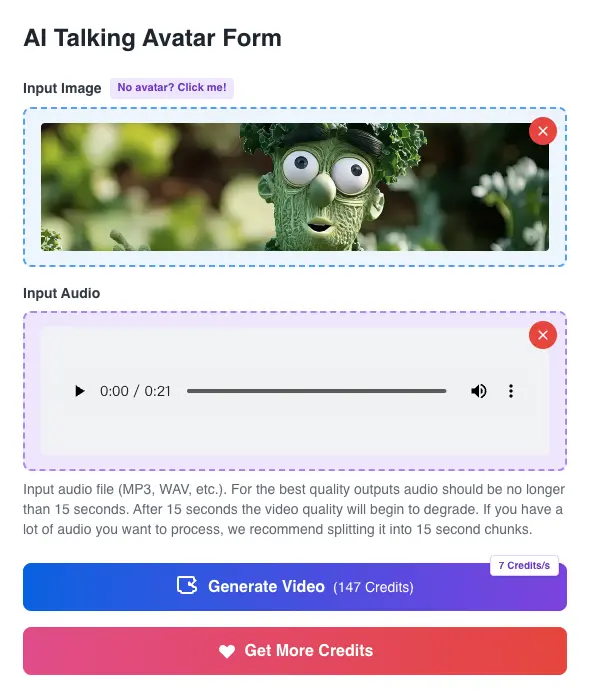
Upload Image and Audio
Add a clear, front-facing avatar photo and upload an audio file, then click Generate Video.
Check Audio Length and Quality
Short, clear voice clips usually produce the best results. If your script is long, split it into shorter segments so each talking avatar stays crisp and stable.
Generate, Preview, and Download
Wait for generation, preview the result, and download the video when it is ready.
Who Uses AI Talking Avatar?
Marketing & Sales
Create spokesperson intros, product explainers, follow-up videos, and campaign variants from a single portrait without booking shoots.
Social Media Creators
Publish reactions, commentary, announcements, and character-led clips faster when you want regular output without recording every update.
Educators & Training Teams
Build lesson intros, onboarding explainers, and multilingual training videos with a repeatable avatar workflow that is easy to update.
Museums & Tourism
Animate guides, historical figures, and exhibit narrators to deliver engaging voice-led experiences across kiosks, sites, and digital tours.
Stylized Avatar Creators
Bring illustrated characters, mascots, pets, and branded avatars to life for entertainment, education, and lightweight promotional content.
Frequently Asked Questions about AI Talking Avatar
- Clear, front-facing portrait with one face
- Good lighting and sharp details
- Neutral or closed mouth for more natural lip sync
- Marketing and sales explainers
- E-learning intros and lessons
- Social media announcements
- Museum and tourism narrations